Menu

#9233 Task plugin

Parent Category:
DPCalendar
Category:
Joomla plugins
Last Updated:
Allon Moritz, Thursday, 28 May 2026 07:32 (10 hours ago.)
Created:
Thursday, 16 June 2022 07:18
Hits:
4857

This feature is part of the DPCalendar Standard subscription.
SubscribePHP 8Joomla 4.4Joomla 5Joomla 6

Introduction

The task plugin offers the possibility to run some background tasks through the core joomla task scheduler.

More information about the task scheduler can be found in the official Joomla magazine.
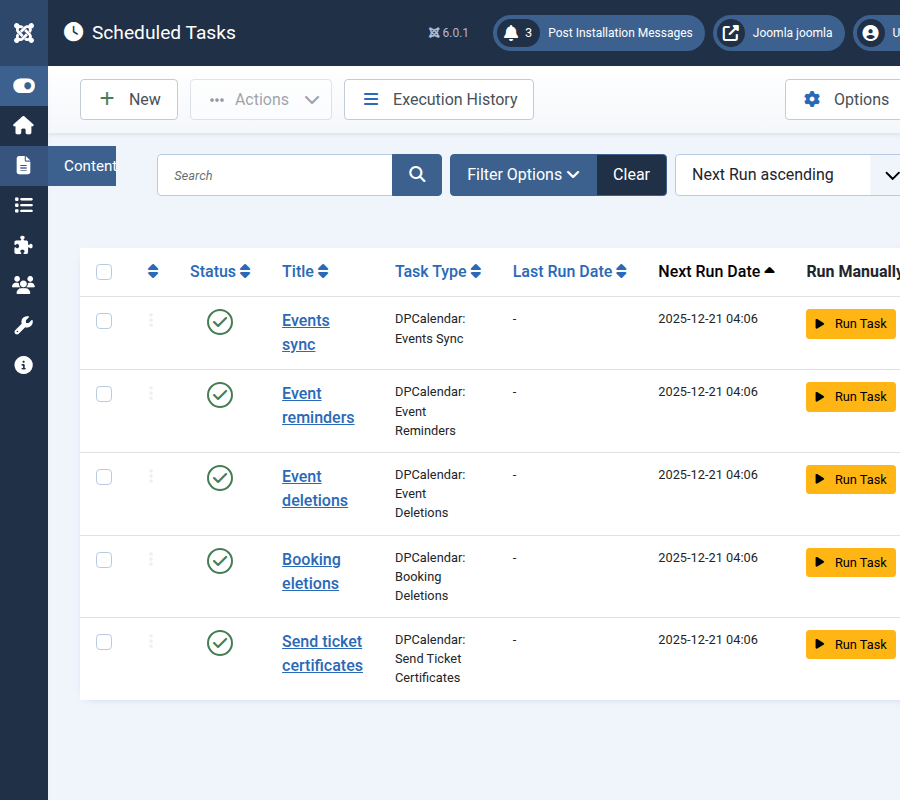
Joomla tasks

Task: Events sync

The event sync tasks does run an event sync of external calendars where database caching is enabled. YOu can read more about the different caching settings in the Cache Settings article.

The admin can define the following options in the parameters of the task:
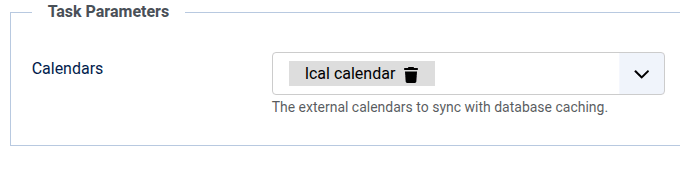
  • Calendars:
    The external calendars containing the events to sync.
Joomla DPCalendar event sync task parameters

Task: Send ticket certificates

The ticket send certificates task does send out certificates for checked in tickets where the event has been finished.

The admin can define the following options in the parameters of the task:

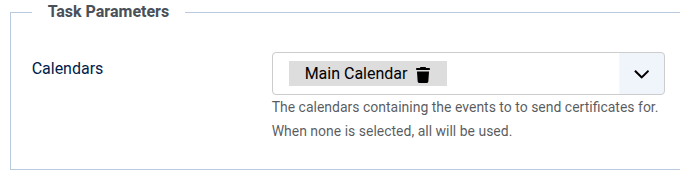
  • Calendars:
    The calendars containing the events to check if they have been finished.

The mail which contains the certificate is generated by mail templates, to adapt the contents search for the mail template ID "com_dpcalendar.ticket.checkin". In the article Notifications is a more detailed description, how to configure mail templates. The available variables which can be used in mail templates are explained in Output rendering, additionally are the following variables available:
  • ticketDetails
    The details of the ticket.
  • ticketLink
    The link to the ticket.
  • ticketUid
    The ticket UID.
Joomla DPCalendar send tickets certificate task parameters

Task: Booking deletions

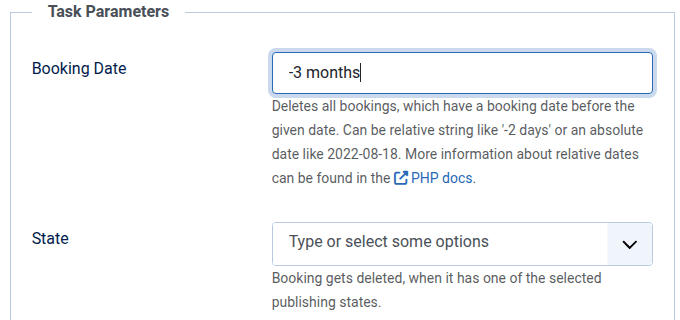
The booking deletions task does delete bookings on different criteria. When no criteria is set, then the task aborts. The criteria are combined, means that the bookings to delete must fullfil every criteria and not just one.

The admin can define the following options in the parameters of the task:

  • Date:
    When there are bookings with a date before the given date, then they are going to be deleted. The date can be selected from the date type option.
  • Date Type:
    The type of date which should be used for the date option, can either be the booking date, the event start date or the event end date.
  • State:
    When there are bookings with a selected state, then they are going to be deleted.
Joomla DPCalendar booking deletion task parameters

Task: Event updates

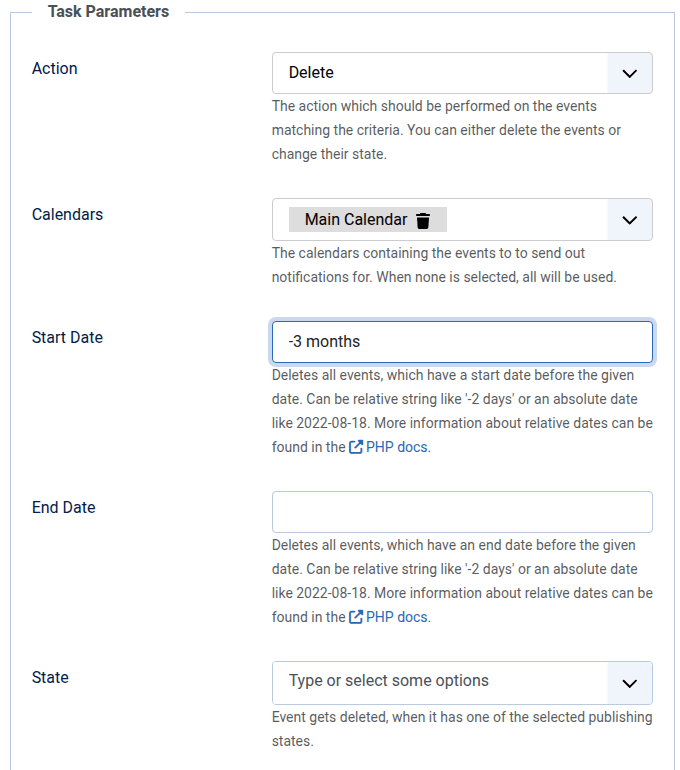
The event update task does change states or deletes events, based on different criteria. When no criteria is set, then the task aborts. The criteria are combined, means that the events to delete must fullfil every criteria and not just one.

The whole series is only deleted when there are no mor instances left. So it is possible to delete some past events, but the series is still in the system as long as there are future events.

The admin can define the following options in the parameters of the task:

  • Action:
    The action to perform, can either be to change the state or to delete the event.
  • Action State:
    When the state of an event should be changed, this option defines the target state.
  • Start date:
    When there are events with a start date before the given date, then they are going to be updated.
  • End date:
    When there are events with an end date before the given date, then they are going to be updated.
  • Calendars:
    The calendars containing the events to delete.
  • State:
    When there are events with a selected state, then they are going to be updated.
Joomla DPCalendar event update task parameters

Task: Event reminders

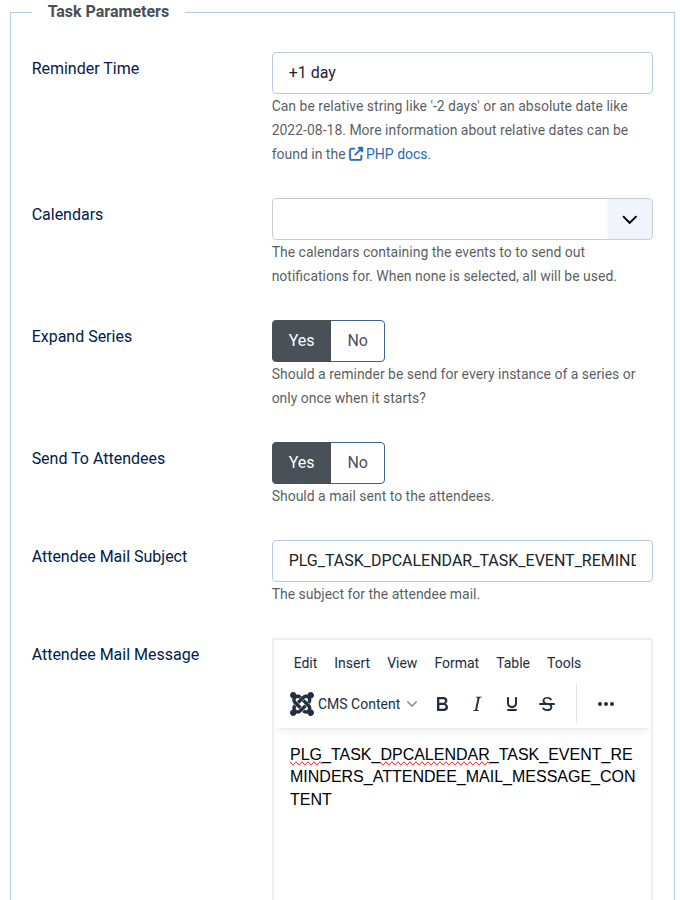
The event reminder task does send out mails to the event attendees and/or authors on a specific date and time in relation to the start date for specific calendars. The most important parameter is the reminder time.

The reminder time can be a relative string like +2 days or an absolute date in ISO 8601 format. When a relative string is used, this means that the reminder is sent out when the actual date and time plus/minus the relative date is like the start date and not that the relative string is subtracted from the start date. More information about relative dates can be found in the PHP docs. For a better understanding, we list here some examples:

  • -2 hours for event start date 2. June 2022 at 17 o'clock. Then the reminder task must be executed on 2. June 2022 at 19 o'clock that the reminder mails are sent out.
  • +1 day for event start date 2. June 2022 at 17 o'clock. Then the reminder task must be executed on 1. June 2022 at 17 o'clock that the reminder mails are sent out.

The admin can define the following options beside the reminder time in the parameters of the task:

  • Calendars:
    The calendars containing the events to notify. When none is selected, all will be notified.
  • Expand Series:
    Defines how series should be handled. If a reminder should be sent when the whole series starts or for every instance.
  • Attendee mail subject:
    The subject for the attendee mail. The event to notify can be referenced with the Output rendering variables.
  • Attendee mail message:
    The message for the attendee mail. The event to notify can be referenced with the Output rendering variables, additionally the {{sitename}} variable is available which contains the global sitename.
  • Author mail subject:
    The subject for the author mail. The event to notify can be referenced with the Output rendering variables.
  • Author mail message:
    The message for the author mail. The event to notify can be referenced with the Output rendering variables, additionally the {{sitename}} variable is available which contains the global sitename.

As default are language strings set in the mail options. For these strings can mail templates be used when the site is multilingual. Should mail templates be used, search for the string "plg_task_dpcalendar.event.reminder.attendee" or "plg_task_dpcalendar.event.reminder.author". In the article Notifications is a more detailed description, how to configure mail templates. Otherwise the plain text can be put into the respective subject and message field. There is also a button to disable sending the mail to the author or attendee. This can be useful when the admin wants to send only to one part.

As it is very unlikely that tasks in Joomla are executed every minute, the notification tasks takes into account that reminders are sent for all events which do have a start date between the last execution time and the reminder time.
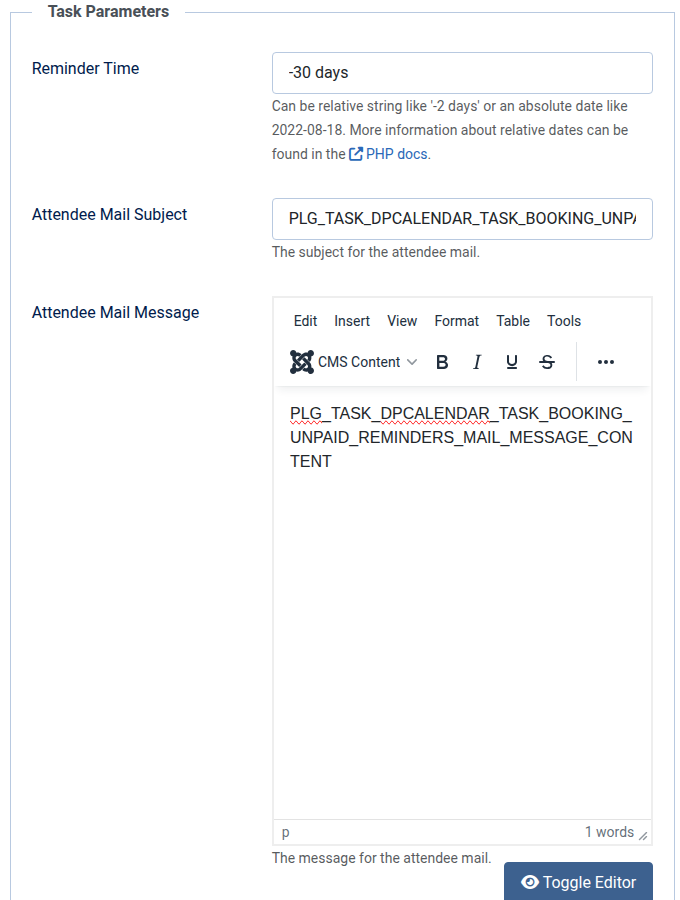
Joomla DPCalendar reminder task parameters

Options

Date [Type: Text]
Deletes all bookings before the given date, check the date type option which date should be used. Can be relative string like '-2 days' or an absolute date like 2022-08-18. More information about relative dates can be found in the PHP docs.
Date Type [Type: List] [Default: Booking Date]
The date type to use for the booking deletion.
The following options are available:
  1. Booking Date
  2. Event Start Date
  3. Event End Date
State [Type: List]
Booking gets deleted, when it has one of the selected publishing states.
The following options are available:
  1. Active
  2. Inactive
  3. Tickets reviewed
  4. Confirmed
  5. On hold
  6. Invited
  7. Cancelled
  8. Refunded
  9. Waiting
  10. Trashed

Options

Reminder Time [Type: Text] [Default: +1 day]
Can be relative string like '-2 days' or an absolute date like 2022-08-18. More information about relative dates can be found in the PHP docs.
Calendars [Type: Dpcalendar]
The calendars containing the events to to send out notifications for. When none is selected, all will be used.
Expand Series [Type: Radio] [Default: Yes]
Should a reminder be send for every instance of a series or only once when it starts?
The following options are available:
  1. Yes
  2. No
Send To Attendees [Type: Radio] [Default: Yes]
Should a mail sent to the attendees.
The following options are available:
  1. Yes
  2. No
Attendee Mail Subject [Type: Text] [Default: PLG_TASK_DPCALENDAR_TASK_EVENT_REMINDERS_ATTENDEE_MAIL_SUBJECT_CONTENT]
The subject for the attendee mail.
Attendee Mail Message [Type: Editor] [Default: PLG_TASK_DPCALENDAR_TASK_EVENT_REMINDERS_ATTENDEE_MAIL_MESSAGE_CONTENT]
The message for the attendee mail.
Send To Author [Type: Radio] [Default: Yes]
Should a mail sent to the author.
The following options are available:
  1. Yes
  2. No
Author Mail Subject [Type: Text] [Default: PLG_TASK_DPCALENDAR_TASK_EVENT_REMINDERS_AUTHOR_MAIL_SUBJECT_CONTENT]
The subject for the author mail.
Author Mail Message [Type: Editor] [Default: PLG_TASK_DPCALENDAR_TASK_EVENT_REMINDERS_AUTHOR_MAIL_MESSAGE_CONTENT]
The message for the author mail.

Options

Action [Type: List] [Default: Delete]
The action which should be performed on the events matching the criteria. You can either delete the events or change their state.
The following options are available:
  1. Delete
  2. Change State To
New State [Type: List] [Default: Unpublished]
The new state for the events.
The following options are available:
  1. Published
  2. Unpublished
  3. Archived
  4. Cancelled
  5. Trashed
Calendars [Type: Dpcalendar]
The calendars containing the events to to send out notifications for. When none is selected, all will be used.
Start Date [Type: Text]
Deletes all events, which have a start date before the given date. Can be relative string like '-2 days' or an absolute date like 2022-08-18. More information about relative dates can be found in the PHP docs.
End Date [Type: Text]
Deletes all events, which have an end date before the given date. Can be relative string like '-2 days' or an absolute date like 2022-08-18. More information about relative dates can be found in the PHP docs.
State [Type: List]
Event gets deleted, when it has one of the selected publishing states.
The following options are available:
  1. Published
  2. Unpublished
  3. Archived
  4. Cancelled
  5. Trashed

Options

Calendars [Type: Dpcalendar]
The external calendars to sync with database caching.

Options

Calendars [Type: Dpcalendar]
The calendars containing the events to to send certificates for. When none is selected, all will be used.

Comments (0)

We use cookies on our website. Some of them are essential for the operation of the site, while others help us to improve this site and the user experience (tracking cookies). You can decide for yourself whether you want to allow cookies or not. Please note that if you reject them, you may not be able to use all the functionalities of the site.