Menu

#630 Notifications

Parent Category:
DPCalendar
Category:
Configuration
Last Updated:
Allon Moritz, Saturday, 05 September 2026 12:20 (23 hours ago.)
Created:
Monday, 04 November 2013 15:06
Hits:
10463

Introduction

DPCalendar allows you to send notifications to specific user groups when locations, bookings, or events are created, updated, or deleted. To configure these notifications, administrators can define an unlimited number of rules for different actions. Each notification can specify the target user groups, the action that triggers it, and whether the author should also receive the notification. For events, notifications can also be configured on a per-calendar basis. These are applied in addition to the global notification settings.

In the mail template settings, it is mandatory to enable HTML as mail format rather than plain text, as DPCalendar provides notification messages in HTML format only.
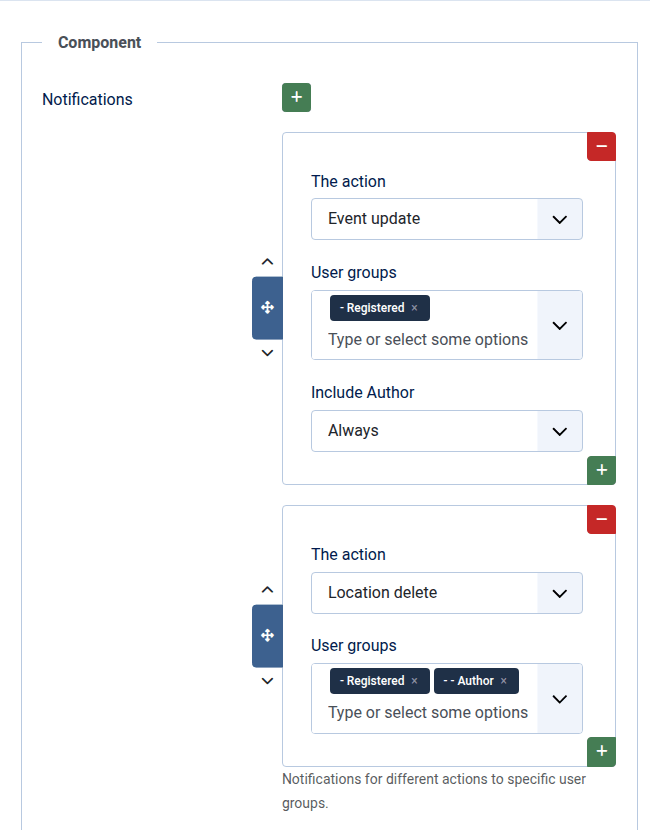
DPCalendar notifications

Customizing the mails

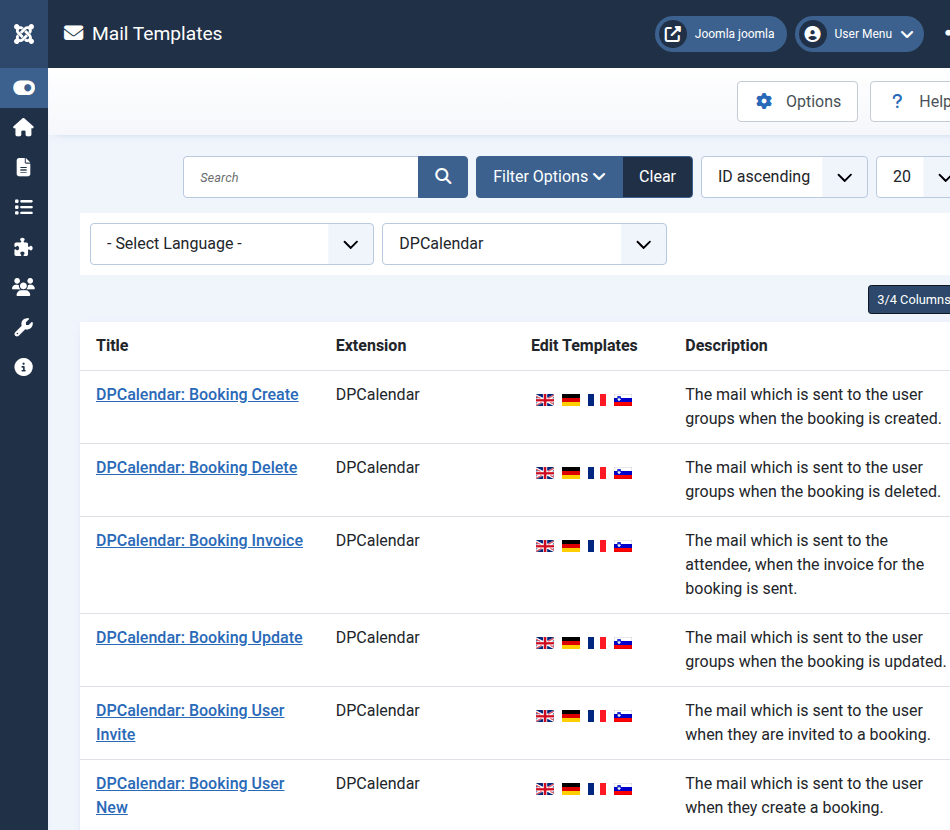
DPCalendar uses the core mail template feature from Joomla, allowing administrators to customize the email subject and body for each action in the user interface. Mail templates can be configured in the backend under the "Mail Templates" system menu link or in the DPCalendar component menu. To view all available templates, filter by DPCalendar or the other DPCalendar related extensions.

The following list shows the available variables per action and the associated mail template:
  • com_dpcalendar.event.create
    • {{events}} see Output rendering
    • {{user}} the currently logged in user
    • {{sitename}} the sitename from the global configuration
  • com_dpcalendar.event.update
    • {{events}} see Output rendering
    • {{user}} the currently logged in user
    • {{sitename}} the sitename from the global configuration
  • com_dpcalendar.event.update.author
    • {{events}} see Output rendering
    • {{user}} the currently logged in user
    • {{sitename}} the sitename from the global configuration
  • com_dpcalendar.event.delete
    • {{events}} see Output rendering
    • {{user}} the currently logged in user
    • {{sitename}} the sitename from the global configuration
  • com_dpcalendar.event.delete.author
    • {{events}} see Output rendering
    • {{user}} the currently logged in user
    • {{sitename}} the sitename from the global configuration
  • com_dpcalendar.booking.create
    • {{bookings}} the booking object, access all properties like {{#bookings}}{{first_name}} {{email}}{{/bookings}}
    • {{{bookingDetails}}} the detail list of the bookings, rendered from the layout /components/com_dpcalendar/layouts/booking/details.php should be used with three mustaches to not escape the HTML in it
    • {{bookingLink}} the link to the booking
    • {{bookingCancelLink}} the link to cancel the booking
    • {{bookingUid}} extra variable for the booking UID
    • {{bookingStatusLabel}} the label for the booking status
    • {{tickets}} the booking tickets list access all properties like {{#tickets}}{{first_name}} {{email}}{{/tickets}}
    • {{countTickets}} the amount of tickets
    • {{acceptUrl}} the url to accept a booking invitation
    • {{declineUrl}} the url to decline a booking invitation
    • {{events}} see Output rendering
    • {{user}} the currently logged in user
    • {{sitename}} the sitename from the global configuration
  • com_dpcalendar.booking.update
    • {{bookings}} the booking object, access all properties like {{#bookings}}{{first_name}} {{email}}{{/bookings}}
    • {{{bookingDetails}}} the detail list of the bookings, rendered from the layout /components/com_dpcalendar/layouts/booking/details.php should be used with three mustaches to not escape the HTML in it
    • {{bookingLink}} the link to the booking
    • {{bookingCancelLink}} the link to cancel the booking
    • {{bookingUid}} extra variable for the booking UID
    • {{bookingStatusLabel}} the label for the booking status
    • {{tickets}} the booking tickets list access all properties like {{#tickets}}{{first_name}} {{email}}{{/tickets}}
    • {{countTickets}} the amount of tickets
    • {{acceptUrl}} the url to accept a booking invitation
    • {{declineUrl}} the url to decline a booking invitation
    • {{events}} see Output rendering
    • {{user}} the currently logged in user
    • {{sitename}} the sitename from the global configuration
  • com_dpcalendar.booking.delete
    • {{bookings}} the booking object, access all properties like {{#bookings}}{{first_name}} {{email}}{{/bookings}}
    • {{{bookingDetails}}} the detail list of the bookings, rendered from the layout /components/com_dpcalendar/layouts/booking/details.php should be used with three mustaches to not escape the HTML in it
    • {{bookingLink}} the link to the booking
    • {{bookingCancelLink}} the link to cancel the booking
    • {{bookingUid}} extra variable for the booking UID
    • {{bookingStatusLabel}} the label for the booking status
    • {{tickets}} the booking tickets list access all properties like {{#tickets}}{{first_name}} {{email}}{{/tickets}}
    • {{countTickets}} the amount of tickets
    • {{acceptUrl}} the url to accept a booking invitation
    • {{declineUrl}} the url to decline a booking invitation
    • {{events}} see Output rendering
    • {{user}} the currently logged in user
    • {{sitename}} the sitename from the global configuration
  • com_dpcalendar.location.create
    • {{locations}} the location object, access all properties like {{#locations}}{{street}} {{city}}{{/locations}}
    • {{backLinkFull}} the link to the location
    • {{formattedAddress}} the formatted address with comma separated
    • {{user}} the currently logged in user
    • {{sitename}} the sitename from the global configuration
  • com_dpcalendar.location.update
    • {{locations}} the location object, access all properties like {{#locations}}{{street}} {{city}}{{/locations}}
    • {{backLinkFull}} the link to the location
    • {{formattedAddress}} the formatted address with comma separated
    • {{events}} see Output rendering
    • {{user}} the currently logged in user
    • {{sitename}} the sitename from the global configuration
  • com_dpcalendar.location.delete
    • {{locations}} the location object, access all properties like {{#locations}}{{street}} {{city}}{{/locations}}
    • {{backLinkFull}} the link to the location
    • {{formattedAddress}} the formatted address with comma separated
    • {{events}} see Output rendering
    • {{user}} the currently logged in user
    • {{sitename}} the sitename from the global configuration
DPCalendar mail templates

Edit mail template

It is important to understand how core mail templates work. DPCalendar comes with some language strings, these strings act as default for mail templates, when configured. As soon as a mail template is saved in a language, then the language string is not used anymore. Even when DPCalendar changes it's constant in an upcoming release. To define a mail template, click on a language flag in the overview list (/administrator/index.php?option=com_mails&view=templates) and adapt the content.
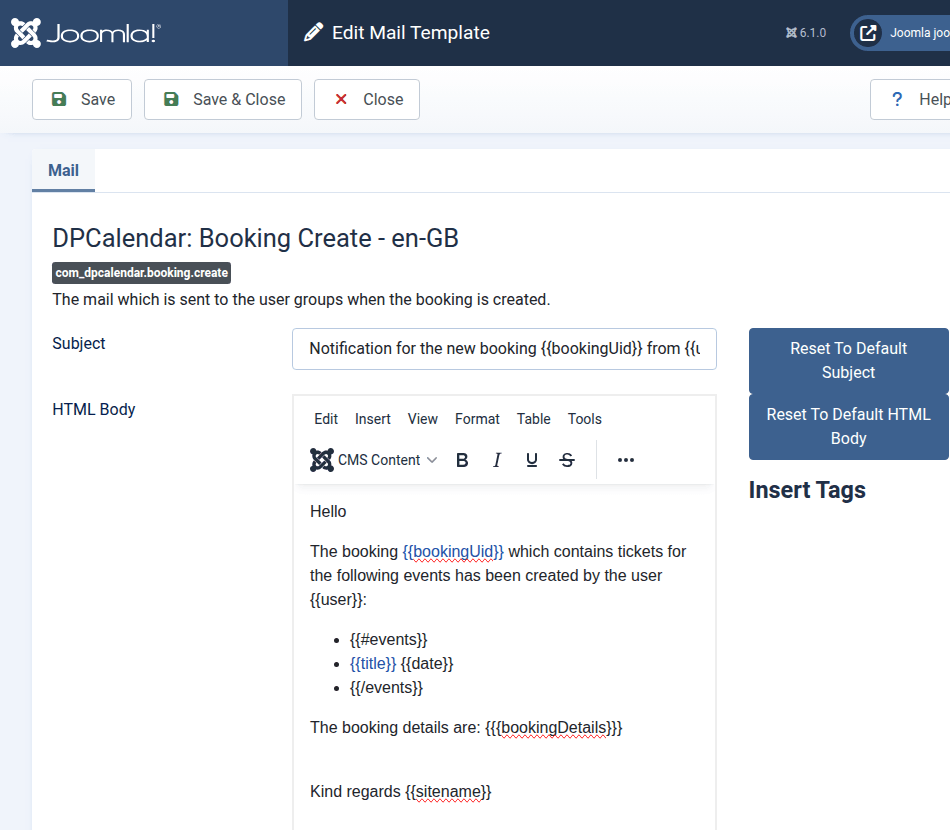
DPCalendar mail templates form

Comments (0)

We use cookies on our website. Some of them are essential for the operation of the site, while others help us to improve this site and the user experience (tracking cookies). You can decide for yourself whether you want to allow cookies or not. Please note that if you reject them, you may not be able to use all the functionalities of the site.